
Showing posts with label foto's. Show all posts

Friday, 19 June 2009

Adjustment Layers......How to

Right, thought I better be of some use or of use to some of you, whichever I have decided to do a post about photoshop! So for those of you that don't know, this is a mini tutorial on using adjustment layers. I have used CS3 on a mac so things may differ if using a older / newer version or a PC.

Adjustment layers basically allow you to adjust curves, colour balance, saturation, levels and various other common editing tools by layer, so you can target different areas of the image rather than the
whole thing. This is particularly useful when colour managing an image as you can concentrate on the skin, then the hair, then the background and so forth building up as many layers as you like. Plus you use the brush so can choose opacity and the use of layers allows you to alter opacity as well.

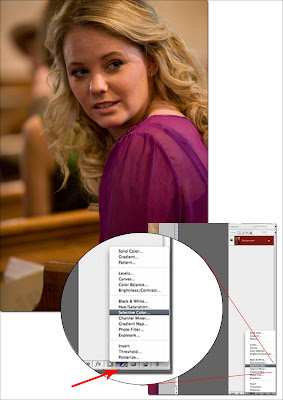
So open your image. Choose the area to focus on. In this case I am reducing the red in the face and the yellow in the background. First your go to the layers palette and select the 'adjustment layer' tool. A new layer will appear with whatever adjustment you have chosen. In my example you can see that I have used the selective colour tool, therefore my new layer is concentrating on adjusting various colour channels within the image.
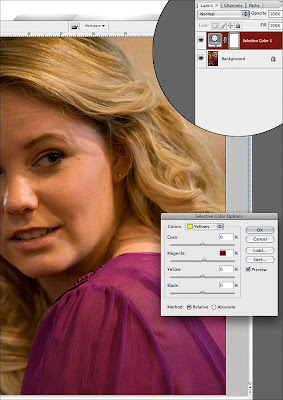
Adjust as you would but concentrate only on the part of the image you want to change. So in this c
ase I am adjusting the magenta / red in the face. Don't worry about anything else in the image, just the part you want this colour adjustment to apply to.

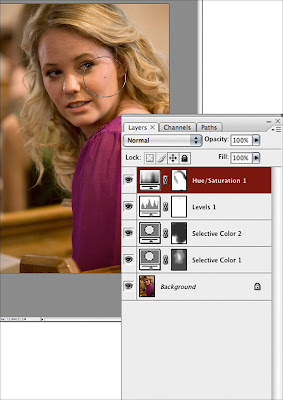
Once done select the mask on the layer, take the brush tool, make sure black is selected and choose your opacity. I would recommend 50% at first, subtle but it works. Then brush back in those areas you do not want the changes to take place. So, in this case I brushed back in the clothes, background and hair so that the adjustment only affected the face. You can then adjust the opacity of the layer if you wish.

You can also do as many layers as you like. So the next example shows a few more colour adjustment layers and you can see from the mask where the picture has been affected and where it has not. Each new layer will concentrate on a different part of the image.
Once you have what you want and you are happy with the adjustments you can carry on editing as normal!
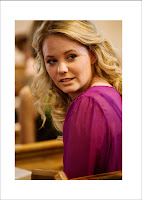


PS: For skin, selective colour is often used. However I find that using the hue/saturation tool is just as effective when using layers and just change the hue ever so slightly and the saturation of the magenta.


More random ramblings and tips and tricks to follow next week! If there is something in particular you want to know.....get in touch!

Carli x

Friday, 20 February 2009

Catch Up....

So I haven't written an 'Editors Note' for a while and I presume it must be an obligatory thing....anyway the Fat Blog is looking very FAT and I think we have a really great team here....thank you all! We have had a great guest writer with more to follow, some brilliant interviews, tips and tricks, events up dates and general knowledgeable rants from the team. We have a new fashionista joining the team shortly who will be bringing a few more cotton, lycra and pvc (ooo err) related posts your way and in association with Fat Talent will continue to bring you updates on the monthly fashion and live music event. So with more networking advice, life advice, tales of the London Lights and the fact we are now even offering advertising and positivly encouraging YOU to be exposed on our blog with our Fat Chats......there is even more reason to stick around!!

Contact us anytime at fattalent@live.co.uk

Saturday, 29 November 2008

"But they cant be real people" Charlie said....


I LUUURRRVEEE Tim Walker, if there is anyone I truly inspire & gets me all excited & giggly about fashion photography it is this man. His fanciful images contain such unimaginable detail, demonstrating bits of those dreams we've had or things we have envisioned after reading a great story that you couldn't possibly think could be visualised. His latest shoot in Vogue is amazing and focus's on the stories of Road Dahl; he brings together seamlessly art, fashion, photography & the genius of Dahl. Capturing in an unexpected and perfectly mastered frenzy, the sets are bright, bold and totally ridiculous - one day I hope to be able to spill my imagination, questions, fantasies & intrigue onto a page like he can. Fabulous!!


"A woman who my mother knows came in and took off all her clothes,
Said I not being very old, 'By Golly gosh you must be cold'
'No No!' she cried 'I indeed am not, I'm feeling devilishly hot!"
(RHYME STEW - ROAD DAHL)

Foto x

Thursday, 13 November 2008

Think about it.....


"You can complain because the Rose bush has Thorns.......or rejoice because the Thorn bush has roses." (Lao Tse)

Ok so religion and fashion, how do they possibly relate? I just feel they do somehow, they both create so much hype and such a huge following yet like an empty vase its all just a pretty exterior. It really interests me, the two together. The iconic status you can give a piece of clothing or jewelry or fashion designer & the way its like a faith to people, they follow, they worship and eventually they surrender. Should fashion even be this powerful, is it even this powerful?? With my images I explore, I ask questions and I look at the opinions or thoughts that I have but through the eye of a lens...I don't even know how the whole religion interest began its just something I find captivating. Its good, to find something engaging and experiment with it......I'm a believer that your imagery should do that. Why am I posting this, cos I am asking you to go ask questions. ....let us know what you find.